
Product thinking meets hands-on engineering
Ray
The system behind
the design system.
I designed Ray and built it from scratch using Claude Code, entirely through AI development. This AI-native approach turned my design-system workflow into a Figma plugin for foundations, re-theming, screens, code and documentation.
See how it works Explore the architecture
- My ownership
- Product, UX & system architecture
- Built for
- My internal design workflow
- Runtime
- Figma Plugin API / TypeScript
- Approach
- AI-native / Claude Code
The product and the process
A Figma plugin.
Built with Claude Code.
 Figma plugin.
 Claude Code.
Ray lives inside the design file. I built it through an AI-native development process.
Theme → components → screens
Runs where the design happens.
Create and re-theme foundations, reuse components and build editable screens directly in Figma.
Ray at a glance
From theme to handoff.
One connected workflow for a new system or an existing one.
Set the foundations
Choose a theme, typography and tokens, or import DESIGN.md.
Create or re-theme
Build components or update an existing design system.
Compose screens
Reuse those components in starter flows and screens.
Generate code
Translate the Figma structure into React components.
Export the handoff
Package specifications, usage code and DESIGN.md.
Every new system.
The same manual setup.
For each new project or re-theme, I repeated foundation setup, component states, starter flows, code and handoff documentation. Manual work could take days or weeks, with the same design decisions needing to stay consistent across each output.
Solution
Carry one set of design decisions through every output.
I built Ray to define or import foundations once, create or re-theme components, reuse them in screens, and export code and documentation from the same workflow.
Rebuild the foundations → restyle the library → assemble screens → translate the handoff.
Define the design intent → generate connected outputs → review and refine.
Business impact
Internal tool / Experience from my own use
Days of setup. A first build in minutes.
Ray replaces repeated foundation setup with a connected workflow for theming, components, starter screens, code and documentation. Its operational value is creating a reusable starting point sooner, leaving more time for product decisions and refinement.
- Current evidence
- In my internal use, an initial system that could take days or weeks manually can be generated in a couple of minutes. Timing varies by scope and machine; review and refinement still follow. This is not a controlled benchmark.
- What to measure next
- Measure time to an approved system, correction effort, re-theme coverage and the usefulness of generated code in a real application.
A walkthrough of the product
One connected workflow.
Each step reuses the system’s decisions. Explore what the designer controls and what Ray produces.
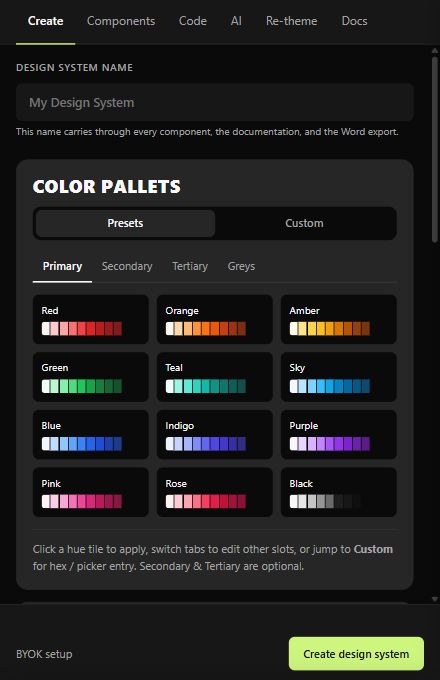
Start with the rules.
Name the system, choose a palette, set typography and select a visual theme. Ray turns those decisions into reusable foundations instead of another disconnected UI kit.
A saved DESIGN.md carries the design intent into the rest of the workflow.
How I structured the product
From design intent to editable screens.
Start with Markdown or theme choices. Follow how Ray structures the rules, selects an execution path and turns a screen definition into editable Figma objects.
Follow a request through Ray. Choose an input, then an operation to see which engine takes over.
Your decisions enter in two ways.
The designer supplies the intent. Ray parses or assembles the data.
---
name: Northstar
colors:
  primary: "#c3ff00"
typography:
  body:
    fontFamily: Inter
---
## Brand & Style
Clear, focused interfaces.
A Markdown document can contain structured frontmatter and human-readable guidelines.
{
  "name": "Northstar",
  "colors": { "primary": "#c3ff00" },
  "typography": {
    "body": { "fontFamily": "Inter" }
  },
  "spacing": { "md": 16 },
  "rounded": { "md": "8px" }
}
A simplified JSON representation of the DesignMd object. This stores design decisions; it is not a screen layout.
Normalize the vocabulary.
Imported color names are translated into canonical slots. For example, Material-style names can map to the Shadcn-style vocabulary used downstream. Typography, spacing and radius data travel with the contract.
surfacebackgroundon-surfaceforegroundThe request selects the engine.
The same active contract supplies the rules. The selected operation decides which engine runs.
Load the layout. Resolve the theme. Render.
Industry and flow choices locate a registered pattern. Its saved JSON contains the screen structure, so Ray can render the flow directly. The system supplies the current colors, styles and components from the existing or re-themed library.
- Find the pattern
SaaS → onboarding → screen definitions
- Load saved JSON
AIDocument trees from the pattern store
- Render with the theme
Resolve roles, expand recipes, create nodes
If a registered pattern cannot be fetched and no usable copy is available, Ray reports the failure. It does not silently replace that path with a paid AI call.
Where this lives in the implementation
flows/ → asset-fetcher.ts → renderAIDocument()A screen tree becomes an editable canvas.
Saved-pattern JSON and parsed AI responses meet at the same renderer. It resolves the theme and creates editable Figma objects.
{
  "name": "Welcome",
  "root": {
    "type": "frame",
    "direction": "vertical",
    "fill": "@role:bg",
    "children": [
      { "type": "text",
        "content": "Your workspace",
        "fill": "@role:fg" }
    ]
  }
}
Illustrative AIDocument shape. This defines what to draw and how to arrange it.
The shared renderer
- Expand named layout recipes
- Resolve roles to file styles or contract colors
- Find reusable component instances
- Create frames, text and auto layout
renderAIDocument()- Editable layers
- Theme-aware styling
- Reusable components where available
The design contract and the screen JSON do different jobs. The contract says which visual rules to use. The layout tree says which elements to create. The renderer brings them together; a Markdown file alone does not specify an entire screen.
The editable file becomes a developer handoff.
Ray carries the design decisions into two complementary outputs.
Component code
React components for Shadcn, Radix or Tailwind, generated through a shared intermediate representation.
System documentation
A Word-compatible document and DESIGN.md, with specifications, component descriptions and usage examples.
Where I designed out unnecessary AI work.
Use code for repeatable rules. Ask the model when the request needs interpretation.
Translate names with rules
A synonym dictionary and color-role heuristics normalize imported color names. This translation does not need an LLM call. Unmapped keys are recorded instead of claiming every vocabulary is understood.
design-md-translate.tsReuse small layout recipes
Named patterns are functions that expand into frame, text and instance trees. AI can refer to a reusable recipe instead of spelling out the same low-level layout repeatedly. Token savings vary with the request.
ui-patterns.ts → expandPattern()Render saved flows directly
Registered flows already contain screen JSON. Their render path bypasses the model entirely: no new prompt and no new AI response are needed to reconstruct the same screen structure.
pattern-registry.ts → renderAIDocument()Reuse downloaded assets
Memory and Figma clientStorage cache pattern assets, with network checks for changes. This reduces repeated asset loading; it is asset caching, not a claim of model prompt caching.
asset-fetcher.tsThese diagrams explain the architecture I built. They illustrate how Ray works; token savings have not been benchmarked.
Inspect the six implementation layers
Choose a layer to inspect the decision behind it. Arrows show the primary path; code and documentation are separate outputs.
Use repeatable construction for repeatable work.
The message router dispatches system builders, re-theme operations and registered flow definitions. For an open-ended request, the AI path produces a structured layout description; a renderer turns that description into Figma nodes.
Why I made this choiceSaved patterns do not need a fresh model response on every render. AI is reserved for the work that benefits from interpretation.
Implementation modules
code.ts · components*.ts · flows/ · ai-generation.tsSupporting services stay outside the canvas.
Supabase supports authentication, pattern storage and optional AI proxying. Assets use a memory → local storage → network cache. These integrations are separated from the document-building code. Ray is presented here as my internal tool, not a publicly launched service.
Existing systems, new possibilities
Re-theme the foundation.
Keep the components.
Ray can work with an existing design system, including one built outside Ray. It updates supported foundation tokens and styles, then uses the existing or re-themed components to create screens.
The change happens at the foundation: color variables, typography, spacing and radii. Bound component instances follow those values. Preserve mode keeps variable identity and file structure intact; compatibility depends on the file’s token and style mappings.
Try a foundation update
1. Choose colors. 2. Click Re-theme. 3. Reuse the components in a screen.
Choose foundation colors, then apply the re-theme.
Interactive illustration of Ray’s token propagation. This does not connect to or modify a live Figma file.
brand / primary #c3ff00surface / base #10191dWorkspace setup
A reusable card with a primary button, status and surface.
ContinueButton fill → primaryCard fill → surface
Welcome back.
Same component. Same token bindings.
ContinueThe component is not rebuilt for each color change. In Figma, Ray updates supported variable values and styles. Bound components inherit the update; screen generation can then reuse those components. Unbound, hard-coded values need separate handling.
Engineering choices, explained
Built for more than the happy path.
The system needs predictable boundaries, especially when AI, existing files and several export formats meet.
Re-theme values, preserve relationships.
Renaming or rebuilding variables can break an existing file. Preserve mode changes supported color values while retaining variable identity and aliases. Unrecognized palettes need review rather than a promise of universal conversion.
Keep AI behind a clear boundary.
Provider adapters normalize four AI services behind one interface. The agent has an eight-turn limit. A missing saved pattern produces an actionable error instead of silently falling back to paid AI generation.
Share the translation layer.
Token resolution and variant extraction happen before the code target is chosen. A shared IR carries those decisions into three emitters, making additional targets easier to reason about without duplicating the whole pipeline.
Where I deliberately set limits
- Pattern unavailable
- Surface the fetch error. Do not silently substitute an AI-generated flow.
- Large code selections
- Truncate very large trees to stay within plugin-data limits; review the result.
- Generated screens & code
- Treat them as editable starting points. Validate responsiveness, accessibility and product logic.
What the internal build demonstrates
A working product.
A repeatable foundation.
My internal use showed that the approach worked for the setup problem. These counts describe the current implementation, not adoption or customer impact.
- 5
- Registered flows
- 30
- Catalog screen definitions
- 3
- React code targets
SaaS onboarding and invites, creator, AI / dev tools, and health onboarding.
Across the five registered flows, with theme-aware rendering.
Shadcn, Radix and plain Tailwind, using a shared translation pipeline.
I took a recurring design problem, defined the product, designed the workflow and developed Ray entirely with Claude Code. The critical work was deciding how the parts should connect: what to generate, what to preserve, where AI belongs and how a designer continues after generation.
What I would measure next
Time to an approved system, correction effort after generation, re-theme coverage on existing files, and code usability in a real application. A faster first pass matters only if the output stays useful.
Built through an AI-native process.
Claude Code handled the implementation. I directed the product, experience and system architecture. This describes the development approach; inside Ray, deterministic builders and optional runtime AI still have separate responsibilities.

From solving my own workflow to building a tool for it.


